Your AI study companion made simple

Welcome to your family-friendly AI chat platform. Get help with homework, research, and learning in a safe, supportive environment.

Get Started

Quick Start Guide

1

Start a Chat

Click "New Chat" to begin a conversation with your AI study companion.

2

Ask Your Question

Start with your homework question, research topic, or concept you need help with.

3

Save & Share

Save important conversations and share study notes with family members.

Use on Mobile

Add to Home Screen

📱 iOS (Safari)

  1. Open this website in Safari browser
  2. Tap the Share button (square with arrow up)
  3. Scroll down and tap "Add to Home Screen"
  4. Customize the name if desired, then tap "Add"

iOS Safari share menu
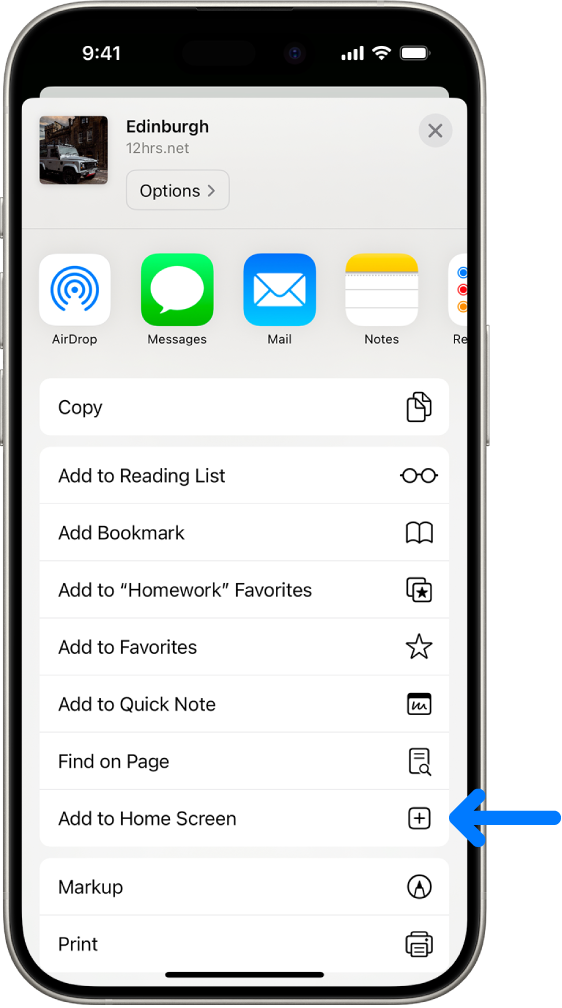
iOS Safari share menu showing Add to Home Screen option

🤖 Android (Chrome)

  1. Open this website in Chrome browser
  2. Tap the menu button (three dots)
  3. Select "Add to Home screen"
  4. Confirm the name and tap "Add"

Android Chrome menu
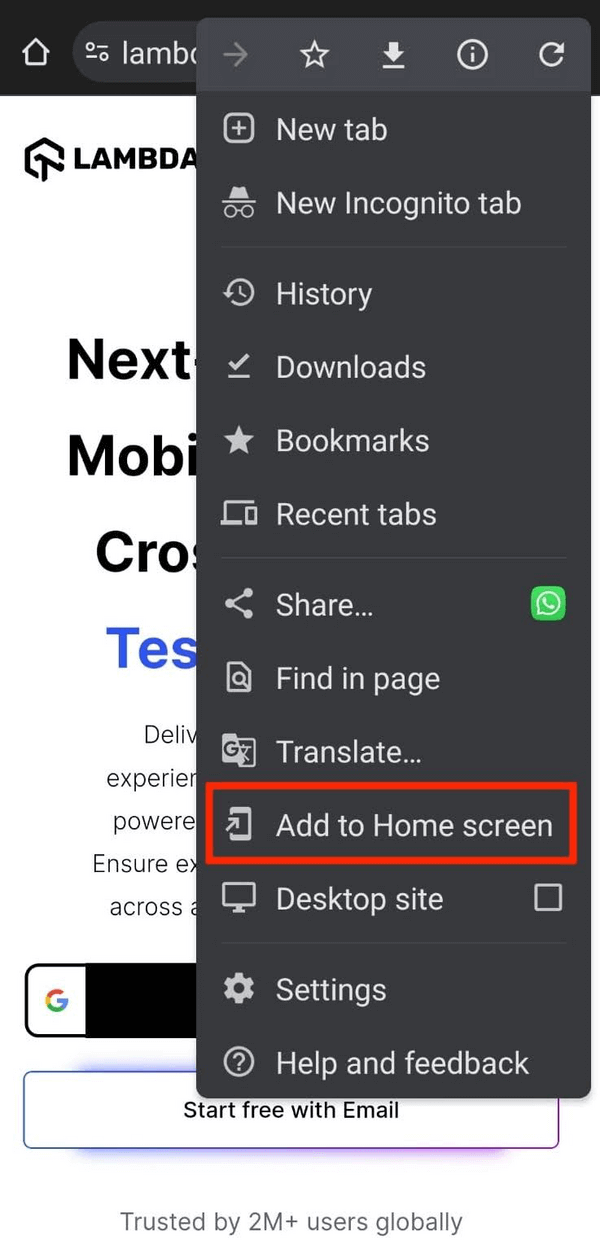
Android Chrome menu showing Add to Home screen option

App Benefits

Add to Home Screen Benefits

📱
Quick Access

Launch directly from your home screen like a native app

🖥️
Full-Screen Experience

No browser bars or navigation clutter

Faster Loading

Optimized performance with offline support

🧭
Native Navigation

Smooth app-like transitions and gestures
Choosing AI Models

How to Select Your AI Model

🎯 Step-by-Step Guide

  1. 1.
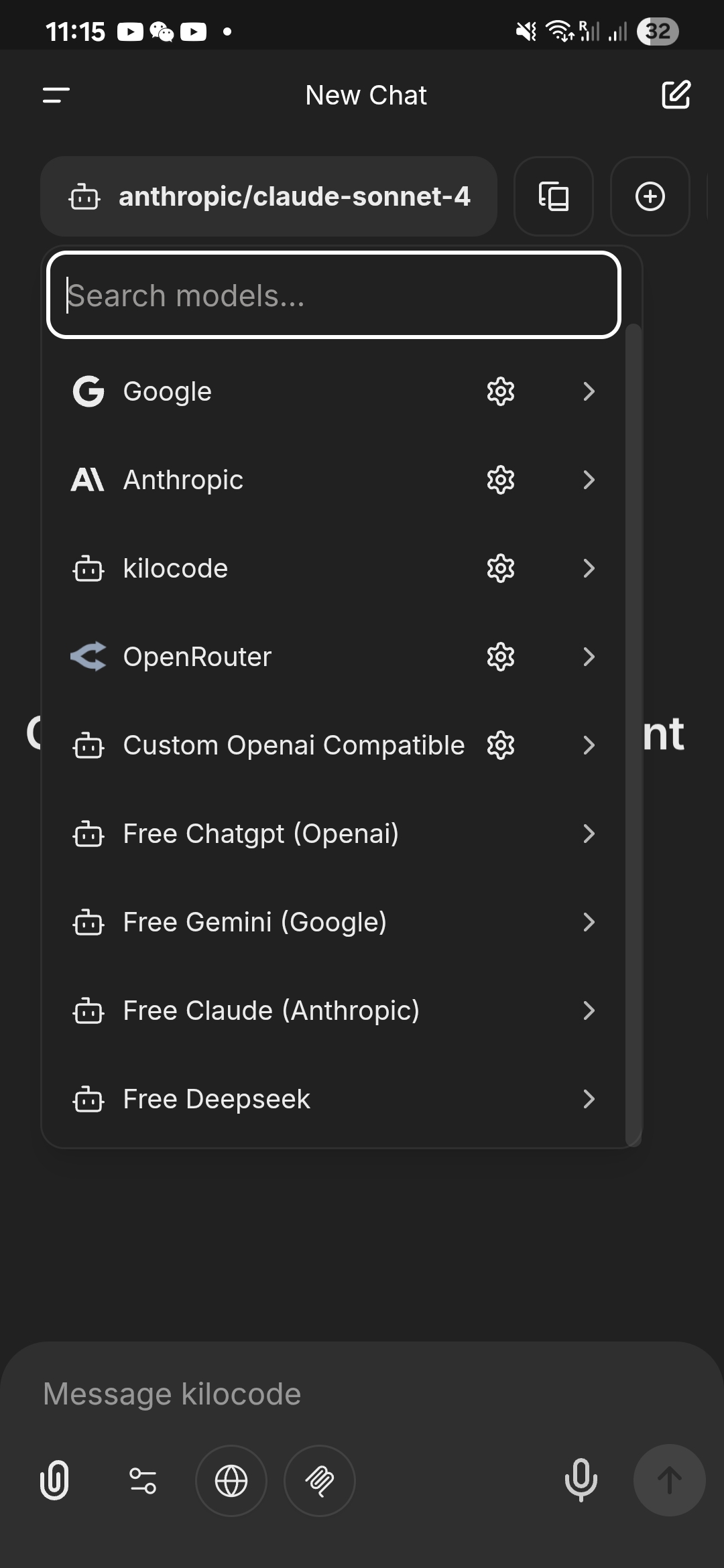
    Click the Model Button: Look for the dropdown button in the top-left corner of the chat interface - it typically shows the name of your currently selected model.
  2. 2.
    Browse Available Models: You'll see a list of different AI models, each with their own strengths and capabilities.
  3. 3.
    Choose Free Models: Look for models that are marked as "Free" or have no cost indicators. These are perfect for students and families getting started.
  4. 4.
    Select Your Model: Click on your chosen model to switch to it. Your new chats will now use this model.

Screenshot: Model selection dropdown interface

Model selection dropdown interface showing available AI models

Recommended Free Models

🤖 GPT Models (OpenAI)

GPT-4o mini

Fast and efficient for most homework help and basic explanations.

Best for: Quick answers, grammar help, simple math problems
GPT-4o

More capable model for detailed explanations and complex questions.

Best for: Research help, detailed explanations, creative writing

🧠 Claude Models (Anthropic)

Claude Haiku

Lightning-fast responses for straightforward questions.

Best for: Quick definitions, basic calculations, simple explanations
Claude Sonnet

Balanced performance for most academic tasks.

Best for: Essay help, analysis, moderate complexity problems

💎 Gemini Models (Google)

Gemini Flash

Great for students needing quick, accurate responses.

Best for: Homework help, fact-checking, general questions

💡 Smart Model Selection Tips

⚡ Speed vs Quality

Faster models give quicker responses but may be less detailed.

  • • Use fast models for quick questions
  • • Choose slower models for complex problems
  • • Switch models based on your needs

🎯 Task-Specific Selection

Different models excel at different types of tasks.

  • • GPT models: Creative writing, general knowledge
  • • Claude models: Analysis, detailed explanations
  • • Gemini models: Fact-checking, research

💰 Cost Awareness

Free models are perfect for students and everyday use.

  • • Start with free models
  • • Check if premium features are needed
  • • Most homework help works great with free models

Essential Features

Web Search Integration

Access up-to-date information and current research to supplement your AI conversations with real-time data.

  • • Get current facts and recent developments
  • • Access reliable sources for research projects
  • • Combine AI insights with verified information

Session Management

Organize your study sessions and keep track of different subjects and topics.

  • • Create separate chats for different subjects
  • • Use descriptive titles for easy reference
  • • Archive completed assignments

Export & Share

Save your conversations and share study materials with family members or study groups.

  • • Export conversations as PDF or text
  • • Share study notes with parents or tutors
  • • Create study guides from chat history

Voice Input

Use voice commands to interact naturally with your AI study companion.

  • • Practice pronunciation for language learning
  • • Dictate long questions or essays
  • • Hands-free studying while taking notes

Artifacts: Generate React, HTML & Diagrams Instantly

Create interactive React components, HTML code, and Mermaid diagrams with AI-powered generative UI capabilities.

  • Instant Prototyping: Generate websites and UIs with generative AI
  • Interactive Learning: Create dynamic, responsive layouts for educational projects
  • Visual Diagrams: Complex idea visualization using Mermaid diagrams
  • Flexible Integration: Use any AI model you have set up
  • Iterative Design: Rapidly improve and refine generated outputs

MCP Integration

Connect to external tools and services through Model Context Protocol for enhanced functionality.

  • Fetch Server: Retrieve web content and convert it to markdown for research
  • Context7: Access up-to-date documentation for libraries and frameworks
  • • Access specialized databases and APIs
  • • Integrate with educational platforms and tools
  • • Extend AI capabilities with custom functions

Understanding AI & LLMs

Study-Specific Tips

Frequently Asked Questions